
Hotel Lobby AI —
the Orange Booth
Duet Trend
Preview 15-second landscape Hotel Lobby AI templates with sound, upload two photos, and create a 15-second 16:9 video. We restore the selected template’s original music; the AI aims to follow its motion rather than copy it frame for frame.
LOBBY AI
VIDEO
Put your duo in the Hotel Lobby AI frame
Upload one clearly visible adult or animal per image. Clear source photos produce more stable characters.
Pick a Hotel Lobby AI template
Open a landscape preview or choose Make this template to jump straight to the creator.
Three moves. One Hotel Lobby AI video.
Upload two clear photos
Use one subject per side with a clear face and even light.
Pick a Hotel Lobby AI template
Choose from fourteen orange, hotel, heritage-inspired, and animal scenes.
Choose quality and generate
Use credits for 480p, 720p, or 1080p. Failed jobs refund automatically.
A TWO-SUBJECT RAP VIDEO FORMAT.
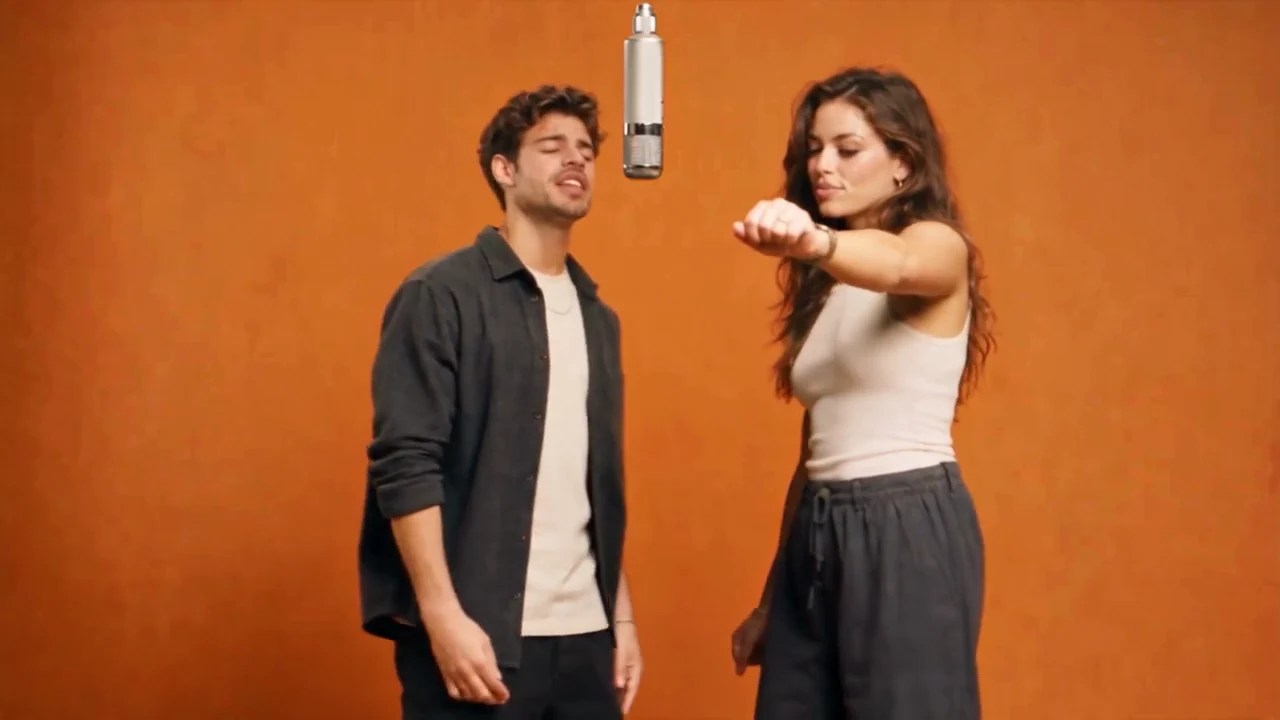
Hotel Lobby AI uses a recognizable visual formula: two subjects, one hanging microphone, a fixed landscape shot, alternating performance gestures, and a synchronized beat.
HotelLobby.ai turns that Hotel Lobby AI format into an upload-and-generate workflow for friends, couples, pets, siblings, and creator teams.
Read the complete Hotel Lobby AI guideBetter photos. Better Hotel Lobby AI results.
Hotel Lobby AI questions before you generate
01Upload two clear photos+
Use one subject per side with a clear face and even light.
02What does one Hotel Lobby AI video cost?+
Every personalized video is a 15-second 16:9 MP4 with the selected template’s original soundtrack restored. The AI aims to follow its choreography; exact movement and lip sync are not guaranteed. Credits never expire.
03Your Hotel Lobby AI video history+
Finished videos are saved for 7 days. Download or delete them before they expire.
04Use only photos you have the right to use.+
Public figures, minors, deceptive impersonation, and copyrighted characters are prohibited.
By HotelLobby.ai · Content updated
What is HotelLobby.ai?
HotelLobby.ai is an independent AI duo template editor, not a hotel concierge, booking service, or human representative.
How do I create a video?
Open the generator, choose a template, upload two authorized photos, choose quality, and generate. Clear source images can help, but no result is guaranteed. generator.
What does the selected template preserve?
The output is 15 seconds in 16:9 as an H.264/AAC MP4, with the selected template’s original soundtrack restored. The AI aims to follow the template’s timing and motion; exact gestures, lip sync, likeness and individual pet appearance are not guaranteed.
Resolution and credits
| Output | Credits |
|---|---|
| 480p | 20 |
| 720p | 45 |
| 1080p | 80 |
Credit packs and prices
| Pack | Credits | Price |
|---|---|---|
| Starter Drop | 50 | $9.90 |
| Creator Stack | 105 | $19.90 |
| Studio Vault | 160 | $29.90 |
What rights and limits apply?
Use only authorized photos, music, and other material. Do not impersonate, deceive, harass, or use prohibited public-figure, minor, or copyrighted-character material.
Pricing · Privacy · Copyright guidance · About · Contact
Which photos should I use?
If no template is selected, orange-street-duo is used. Upload one clear, authorized subject per photo. A headshot guides face-only replacement; a full-body photo can guide face, hair and clothing replacement. The edit aims to follow the reference motion, but likeness, hands and motion can vary. Review the full result before sharing.
How long are files available?
Finished videos are downloadable for seven days. Source image binaries are removed after completion or failure, or by expiration cleanup, with an intended maximum retention of 24 hours. Remote-provider deletion can require retries. Failed or blocked generations return reserved credits; this is not a promise of a cash refund.